
In our sphinx-svdomain release post, we announced the release of the tool. Now we will use a real example to show how it works and what it can do.
The example uses the OpenTitan UART, whose RTL is large enough to show the domain across a realistic design. A top-level wrapper connects the core to separate transmit and receive datapaths, while a generated register package supplies its configuration types. This structure lets one small documentation site demonstrate object extraction, package scoping, and cross-references between related declarations.
The RTL and the surrounding documentation answer different questions. Docstrings explain each SystemVerilog declaration next to the code. The Sphinx pages explain how those declarations work together to form the UART. The generated site combines both views.
What Sphinx adds to an RTL repository
If Sphinx is new to you, the simplest model is a compiler for documentation. Its inputs are plain-text pages and configuration. Its outputs can be HTML, PDF, and other formats. The official getting-started tutorial covers project creation in detail, while our UART example repository already contains the complete layout.
sphinx-svdomain turns SystemVerilog declarations into searchable documentation that can be linked from any page. It covers module interfaces, package declarations, user-defined types, and the objects nested within them.
The example only needs a few commands to build:
$ git clone \
  https://github.com/HardMatrix/sphinx-svdomain-example.git
$ cd sphinx-svdomain-example
$ uv sync
$ uv run sphinx-build \
  -W --keep-going -b html docs _build/html
The result is a static site under _build/html. The -W option turns Sphinx warnings into build failures, so broken cross-references cannot pass unnoticed.
Start with comments the parser can attach
Autodoc generates reference pages directly from SystemVerilog source. In a Sphinx page, .. sv:automodule:: uart_rx asks for documentation for the uart_rx module, while :source: ../rtl/uart_rx.sv tells the extension where to find it. sphinx-svdomain parses that file with pyslang and renders the module declaration together with its docstrings.
In the example, we kept the OpenTitan UART logic unchanged and converted comments attached to SystemVerilog declarations into Doxygen-style docstrings:
/**
 * @brief UART serial-to-parallel receive engine.
 *
 * Detects a low start bit, samples each bit
 * at its center, checks the stop and optional
 * parity bits, and presents a valid eight-bit
 * character.
 *
 * @port rx Asynchronous serial receive input.
 * @port rx_data Received data byte,
 *        least-significant bit first
 *        on the wire.
 * @port rx_valid Pulses when a complete
 *        character has been sampled.
 */
module uart_rx (...);
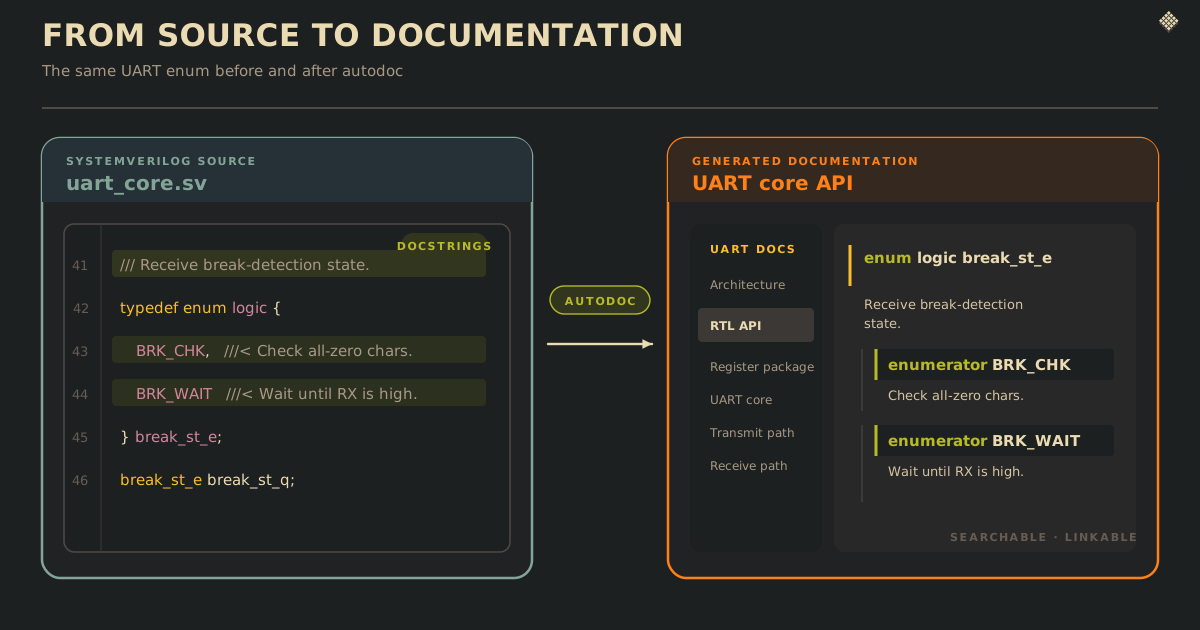
@brief describes the module, while @port attaches text to the matching port declaration. The same mechanism supports @param, @field, @enumval, and function return documentation. Leading /// comments and trailing ///< comments are useful for compact declarations:
/// Receive break-detection state.
typedef enum logic {
  BRK_CHK, ///< Check received all-zero characters for a break condition.
  BRK_WAIT ///< Wait for the receive line to return high after a break.
} break_st_e;
Comments that explain only the internal logic stay as ordinary // comments. Autodoc leaves them out of the generated pages, keeping the API documentation focused on how to use the block.
Generate the API from source
The Sphinx configuration enables sphinx-svdomain and selects its parser backend. This example also enables sphinxcontrib.wavedrom for a timing diagram later in the page, but WaveDrom is optional and independent of the SystemVerilog domain:
extensions = [
    "sphinx_svdomain",
    "sphinxcontrib.wavedrom",
]

sv_autodoc_backend = "pyslang"
The API page then chooses the top-level declaration to extract from each file:
.. sv:autopackage:: uart_reg_pkg
   :source: ../rtl/uart_reg_pkg.sv

.. sv:automodule:: uart_rx
   :source: ../rtl/uart_rx.sv
sv:autopackage, sv:automodule, and sv:autointerface are targeted directives. sv:autofile is available when every supported top-level declaration in a source file should be emitted. The UART example documents the register package first, followed by the wrapper, core, transmit and receive datapaths, and generated register block.
Link documentation to exact RTL objects
Generated API pages show which RTL objects exist and how they are declared. Explanatory pages can link directly to those objects using Sphinx roles:
The :sv:mod:`uart_core` forwards the
synchronized input to
:sv:port:`uart_rx.rx`. Valid data appears on
:sv:port:`uart_rx.rx_data` and is sized by
:sv:param:`uart_reg_pkg::RxFifoDepth`.
Module members use names such as uart_rx.rx_data, while package members use names such as uart_reg_pkg::RxFifoDepth. The rendered text becomes a link to the exact declaration. If a port is renamed or a reference is misspelled, a warning-clean build exposes the stale documentation.
Cross-references make the generated site easier to navigate. A reader can move from the UART overview to a port declaration, follow the types used in its signature, and find the same objects through search. Other Sphinx sites can also link to these objects, allowing system-level documentation to reference the UART API without duplicating it.
Use the rest of the Sphinx extension ecosystem
Because sphinx-svdomain is added to a normal Sphinx project, it can be combined with Sphinx's built-in and third-party extensions. Generated RTL API pages can live beside diagrams, equations, and any other content supported by the project's selected extensions.
The UART example demonstrates this with sphinxcontrib-wavedrom. It renders the frames described in the OpenTitan UART theory of operation as a self-contained SVG during the Sphinx build. One frame shows 8N1, while the other adds parity.
The resulting site places the waveform beside the generated API. Text around the diagram can link directly to uart_tx.tx, uart_tx.wr_data, and the receive error outputs, connecting a timing explanation to declarations extracted from the RTL.
Make documentation part of the RTL workflow
Autodoc keeps signatures and API descriptions close to the RTL, while handwritten pages provide the surrounding explanation. Cross-references connect both views, and build warnings expose stale links as the design changes. Together, these pieces make documentation a checked part of the RTL development workflow.